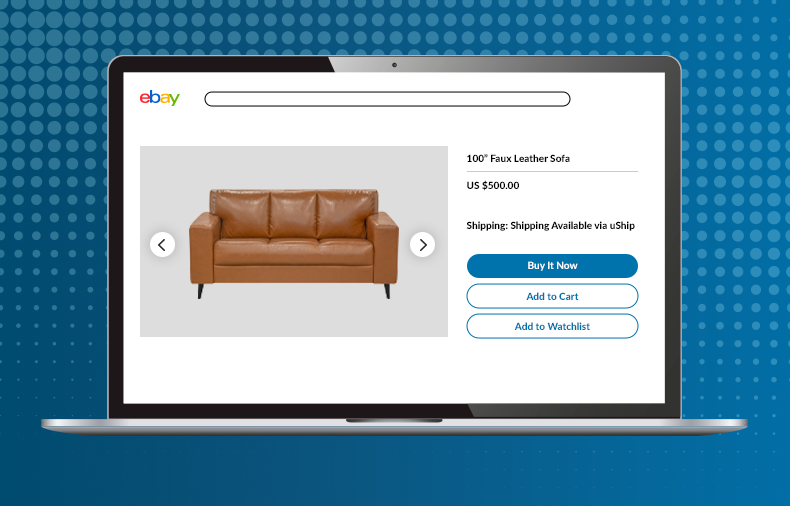
Whether you are listing vintage furniture, heavy equipment, or used cars, selling items on eBay that are too large for standard shipping doesn’t have to be a stumbling block. Most sellers rush to allow only local pickup, believing it’ll make their lives easier. What they don’t realize is that they’re unnecessarily limiting their options.
By offering shipping, you open your buyer pool to more customers. More eyes on your listing means a greater opportunity for capturing a premium price.
If you’re wondering how to offer shipping on eBay for oversized items without handling logistics yourself, the process is simpler than many sellers realize.
This guide walks you through how to offer shipping on eBay for large items without carrying the burden of shipping logistics.
Can eBay Sellers Offer Shipping for Large Items Without Handling Delivery?
Yes, eBay sellers can offer shipping for large items without handling delivery themselves by using a marketplace like uShip.
As the leading marketplace for oversized shipping, uShip makes it easy for sellers to offer items too big for UPS or FedEx without the hassle of figuring out shipping for buyers.
When a seller lists an item as Freight or Local Pickup on eBay, the seller acts as the handoff point. The carriers handle quoting, booking, and transit with the buyer in most cases. If the seller wants to make the buying experience more seamless, they can choose to assist with coordination.
How Do I Offer Shipping on eBay for a Large Item If the Buyer Is Responsible for Booking Shipping?
Buyer-arranged shipping for large items may sound daunting, but with uShip carriers doing the heavy lifting, buyer-arranged shipping is an easy way to make sure your listing is accessible to a national audience.
What the buyer is responsible for
Once they complete the purchase on eBay, the buyer will head to uShip to create a shipment listing. They use the same item details, pickup location, and dates provided on the seller’s eBay listing to receive offers from carriers.
Different carriers will bid on the job, allowing the buyer to compare their options. In addition to pricing, buyers can compare customer reviews, cancellation history, and equipment types to decide which carrier they wish to use.
Once the buyer has chosen a carrier, they book and pay through uShip, where the funds are held securely until the delivery is confirmed. Additionally, the buyer can add the uShip Protection Plan at checkout, providing added peace of mind and financial coverage against damage or loss during transit.
What the seller is responsible for
As the seller, you’re responsible for providing an accurate listing. Be sure your description is detailed. Provide plenty of photos, including close-ups of any dings or damage the buyer might want to fix up. Include precise measurements and any other details the buyer would need to know.
Once the sale is complete, you need to provide proper documentation, like a vehicle title or registration, and prepare the item for pickup. For example, secure loose parts on furniture and boats, lock any storage compartments, and check for fluid leaks on vehicles.
Be sure you’re easy for the buyer to contact so they can follow through with the scheduled pickup.
What happens after the item sells and their uShip listing is live?
Depending on the item, the buyer will either be able to book an instant rate or place their shipment in the marketplace, where carriers can actively bid on their shipment.
The buyer selects a carrier on uShip, books the shipping job, and coordinates pickup with you and the transporter.
Once the item is handed off to the carrier, you confirm the transaction on eBay by scanning the buyer’s QR code or entering their six-digit confirmation code. This handoff provides proof of pickup and helps support seller protections against any “Item Not Received” claims.
Why Letting Buyers Arrange Shipping Helps You Sell Large Items Faster on eBay
Many sellers choose “Local Pickup Only” to avoid the headaches of shipping-related risks, but in truth, this shrinks their buyer pool. Especially for high-value items, the local buyer pool may be far too small to lead to a sale.
By offering shipping, your listing is seen by any interested buyer across the country, broadening your audience and increasing the possibility of competitive bidding.
The great news is that uShip facilitates a smooth handoff, while shipping costs and transportation arrangements are primarily managed by the buyer and carrier. Carriers bid for every shipping job, helping keep shipping costs competitive for buyers and relieving sellers from having to act as middlemen.
Once the carrier arrives and the item is properly handed off, your role as seller is largely complete.
Keeping it simple
Include a link to uShip in your listing description so buyers can easily get shipping quotes. Not only does it help reduce buyer concerns and uncertainty about the shipping process, but it also helps buyers prepare for shipping and realize how easy it can be with uShip.
How to Set Up an eBay Listing for Buyer-Arranged Shipping Step by Step
A properly set-up listing is the backbone of a successful no-touch strategy. When done right, it safeguards you as a seller, sets buyer expectations clearly, and minimizes confusion during the exchange, all while protecting the buyer as well.
Here’s how to do it step by step.
Step 1: Include uShip in your listing
The first step is the most important: Don’t mark your listing as “Local Pickup Only.” This will prevent all out-of-state buyers from being able to consider shipping quotes or participating in the sale.
Step 2: Check the Offer local pickup box
Under the eBay listing’s shipping options, check the “Offer local pickup” box. Even though you do not want to limit your listing to Local Pickup Only, your buyers will be using uShip to select the carrier they are paying to handle the shipment on their behalf. Therefore, the carrier is picking it up for the buyer locally.
Checking this option activates eBay’s Local Pickup handoff, which generates a QR code and six-digit confirmation code you will use when the uShip carrier arrives. This provides you with eBay’s built-in proof of pickup at the handoff to the buyer’s carrier.
Step 3: Select the right listing details for your item
If your large item is something other than a vehicle listed on eBay Motors, select “Freight” under the eBay listing’s “Ship your item” shipping options. eBay doesn’t sell freight labels. By choosing Freight as the shipping service, you are signaling to buyers that shipping is outside standard parcel carrier options and arrangements are handled separately.
If your item belongs on eBay Motors, be sure to communicate buyer-arranged shipping and point your buyers to uShip.
It’s recommended to share a link to uShip and explain to buyers that it’s easy to go to the uShip platform to arrange shipping details.
Step 4: Select Pay on pickup and set the required payment methods
In eBay’s payment options, select “Pay on pickup” along with the approved electronic payment methods eBay requires. This pairs electronically with eBay’s Local Pickup setup and helps ensure eBay’s payment flow remains intact. This is essential for maintaining seller protections.
Step 5: Enter your ZIP code as the item location
Enter your ZIP code as the item location so it displays on your listing. This is what carriers on uShip will see when the buyer enters the item on the uShip platform. This allows carriers to offer their services based on an accurate shipping location.
Step 6: Add details about uShip to your item description
Be sure to mention uShip in your item description. Explain how easy it is for buyers across the country to arrange shipping through uShip by going to the uShip platform.
This is important because it helps inspire buyer confidence, encourages them to get the best price on shipping, and makes it clear that they’re going to a separate platform to arrange their shipping.
Step 7: Provide precise item and handoff details
Carriers on uShip will bid based on the details the buyer enters in their shipping listing. The buyer gets those details directly from your listing, so it’s important these details are accurate and clear. Providing accurate details also helps you avoid any disputes over price, dimensions, weight, or the item’s condition.
Your listing should include exact dimensions and weight. For vehicles and motorcycles, also include:
- VIN
- Engine size in CCs
- Operational or non-operational condition
- Whether it requires a winch or a rollback loader
Additionally, the buyer will need the pickup location and your availability window.
State clearly whether you have a clean title in hand. For boats, also state whether a trailer is included or if the buyer must arrange loading onto their own equipment.
Step 8 Upload comprehensive photos

Photos do two jobs in a large-item listing: they sell the item to the buyer, and they help carriers bid accurately on the job. More detail means better, more accurate bids.
Great photos aren’t just helpful for attracting the right buyer. They communicate the item’s condition while also letting carriers see what they are bidding on. List pictures of the vehicle’s engine bay and undercarriage.
Include photos of the pickup location, showing the driveway, garage entrance, or storage area, to help the carrier plan any clearance or maneuvering they may need.
Step 9: Protect yourself at the payment and handoff
You’re the seller of record on eBay until the item is handed off. To protect yourself and help ensure you’ve followed the proper process:
- Even if you’ve already taken photos for your listing, document the item’s condition at pickup with photos as proof of the item’s exact condition at handoff.
- Only accept payments through eBay for the sale item (excluding shipping).
- Confirm eBay “Payment Received” status before allowing a carrier to load or tow the item.
- At pickup, use the eBay app to scan the buyer’s QR code or their six-digit confirmation code in “My eBay” or “Seller Hub.”
Only after you’ve completed these items are you finished with the transaction. Skipping any of these points can expose you to chargebacks, “Item Not Received” claims, or loss of seller protection.
An important detail to keep in mind for the handoff: The uShip carrier is the one showing up at pickup—not the actual buyer. The buyer should send you the QR code or six-digit confirmation code in advance, or pass it to the carrier so they can provide it to you at pickup. This allows you to complete the eBay handoff immediately once the item is loaded.
It’s also helpful for you to understand the buyer’s experience on uShip so you’re knowledgeable about the entire process when communicating with the buyer or carrier.
When the buyer books a carrier on uShip, their payment for shipping depends on the shipment cost.
For shipments of $10,000 or less, the buyer pays the full shipping cost upfront through uShip Payments, uShip’s secure payments processor. Those funds are held by uShip until after delivery, when the buyer logs into their Booking Confirmation page, clicks Release Payment, confirms the shipment has been received, and releases the Payment Code to the carrier.
For shipments above $10,000, or for shipments in certain categories, the buyer pays a Booking Deposit through uShip at checkout. This covers uShip’s fees, service charge, and the uShip Protection Plan (if purchased). The buyer pays the remaining balance directly to the carrier, typically after delivery, based on the terms agreed to at booking.
As the seller, your responsibilities end when you’ve handed off the item and scanned the QR code or six-digit confirmation code. Completing these steps helps prevent issues related to chargebacks, “Item Not Received” claims, or seller protections.
What’s the Best Wording for an eBay Listing That Says Shipping Available via uShip
Let buyers know you’re happy to facilitate shipping arrangements and recommend uShip for competitive quotes from professional transporters. The buyer pays all shipping costs, and you can help coordinate with the carrier for a smooth pickup if you choose.
Include something similar to this in your listing:
“Nationwide shipping available through uShip. The buyer is responsible for setting this up.”
Also clarify that shipping arrangements and any transportation-related claims are handled according to the applicable terms and protections provided through the shipping platform.
What Item Details Do I Need to Provide So the Buyer Can Book Accurate uShip Quotes
Use this as a checklist before you publish.
All large items
- Exact dimensions (length, width, height) and weight
- Pickup city and ZIP code
- Residence or commercial location
- Driveway or access road clearance for large trucks
- Ground-level pickup or loading dock availability
- Palletized, crated, or needs blanket-wrap/white-glove service
Vehicles and motorcycles
- VIN
- Engine size
- Runs and drives, or non-operational
- Winch or rollback loader required
- Clean title in hand
Boats
- Engine hours
- Trailer included in sale or not
- If no trailer, confirm the buyer must arrange loading equipment
Buyers need these details to get accurate carrier bids. The information above helps carriers understand the size and weight of the item, the level of protection required, how much fuel, time, and equipment they need to factor in, and any challenges they may encounter at the pickup location, including height clearance or difficult access points.
If your item requires any additional special handling, be sure to include those details. This could include flights of stairs at pickup or other location-specific considerations. The more clarity and detail you provide, the easier it is for your buyer to get accurate carrier quotes on uShip, which also helps ensure everything goes smoothly when the carrier arrives for pickup.
What Does Pickup Look Like When a Buyer Arranges Shipping

Once the buyer books a carrier on uShip, coordination moves directly between the buyer and the carrier through uShip’s platform. Your only involvement after the sale is being available during the scheduled pickup.
The carrier and buyer schedule dates and times, while uShip holds shipping funds until delivery is confirmed. The carrier inspects the item and prepares it for safe shipping, including blanket wrapping for household goods.
At the moment of handoff, you scan the buyer’s eBay QR code or six-digit code, and your part of the transaction is officially closed, helping support seller protections against future claims. The carrier provides signature confirmation for items over $750.
Common Mistakes eBay Sellers Make When Offering Shipping on Large Items
It’s important to place just as much attention on communicating the shipping details as on the details of the item you’re selling. A great auction process can fall apart when it comes time to arrange shipping due to the following:
- Leaving out details like condition notes or accurate dimensions
- Agreeing to handle shipping instead of using the buyer-arranged model with uShip
- Being unclear about buyer responsibilities
- Failing to complete the transaction properly, which can affect seller protections
- Not taking quality photos or using outdated pictures of your item
You Don’t Need to Handle Shipping to Sell Large Items on eBay
If you’re wondering how to offer shipping on eBay for large items without taking on logistics yourself, there’s nothing standing between you and a nationwide buyer pool.
With uShip, it’s easy for buyers to arrange shipping for large items anywhere across the country. While your competitors may limit their market size to local buyers, you’ll be able to attract interest from across the nation while giving buyers access to a network of carriers competing for their business.
See exactly what your buyers will experience and how simple it is for them to enter their details with uShip.
FAQs
What types of large items are best for buyer-arranged shipping
Any item that is too large or heavy for standard carriers can be arranged for shipping through uShip. This includes heavy furniture, vehicles, boats, motorcycles, and other large, high-value assets.
Who pays for shipping on large eBay items
When using uShip, sellers can choose a buyer-arranged shipping model, in which the buyer is responsible for booking and payment.
Do you need to package large items for shipping on eBay
No. In most cases, carriers on uShip who bid on shipping your item specialize in as-is pickup. They’ll be responsible for using the necessary materials to help protect items during transit, such as proper tie-downs for motorcycles and vehicles and moving blankets for household goods.
What happens if something goes wrong during shipping
The uShip Ship with Confidence Guarantee and the uShip Protection Plan can help cover damage or loss in transit if the buyer adds this protection at checkout. eBay’s Vehicle Purchase Protection covers other elements such as fraud, non-delivery, and undisclosed defects on eligible vehicle purchases up to applicable coverage limits.
Learn more about how the uShip platform works.